my-cumbria-logo, my-cumbria-logo Toggle navigation

When reading around your subject, it's really important to use academic-level resources and not just websites you've found through Google. All of your reference lists should show that you have drawn information and ideas from a range of sources including books, journal articles and appropriate websites.

Remember all information sources must be carefully evaluated before you use them and then cited and referenced correctly in your assignments.

This page introduces you to essential resources for developing your subject knowledge and producing assignments, as well as giving some pointers on judging the quality of the sources you use.

In addition to the information and resources on this page, you can also discover more about finding the right information for your studies via our Library and Academic Skills webinars


  • Evaluating information

    Not all sources are equally good or useful. What counts as a good and appropriate source depends on your subject area and the assignment you are doing.  Usually, you should use academic sources, but sometimes other sources, such as expert blogs, can also be appropriate.  The important thing is to think carefully about why the information was created, and whether it is reliable and of high quality. 

    A useful tool is the quick 5 Ws approach. 

    WHO Who wrote it, and can you trust them? Are they an expert in this subject area, or a general writer or journalist? Where might they sit on a continuum between academic/expert <--> individual/journalist?
    WHERE Where is it published Is it in a trusted academic journal or on a general website (eg com or .co.uk)?
    WHAT What kind of information is it, and is it useful for your work? Is it research, an opinion or official guidance?
    WHEN How recent is it? Is the information up to date? Or is it a key work that may appear dated but is still deemed significant today?
    WHY Why was this source created? Is it meant to sell something, persuade people, entertain them, or give information? Is it aimed at university students? Does it show any bias or leave out any important information?

    The Website Evaluation Ticklist helps you look at online information more carefully and decide if it is good quality. You can also check out the critical reading page to improve your skills in judging and understanding what you read. 

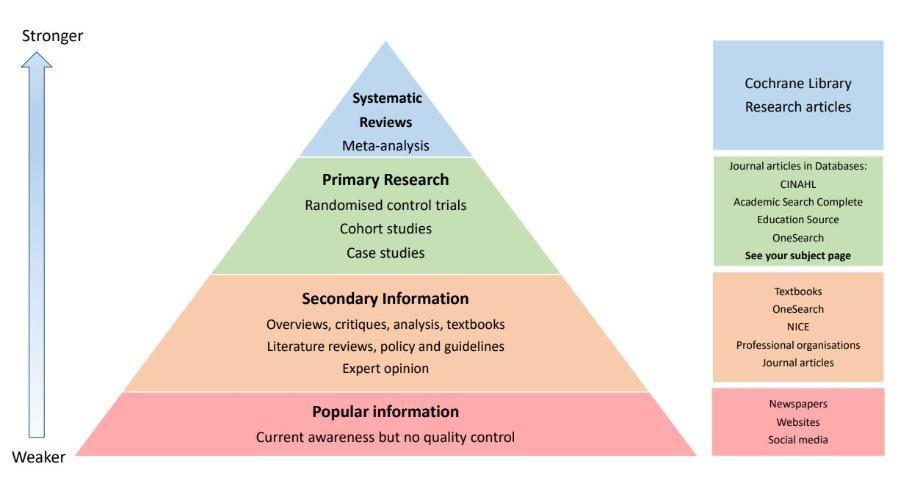
    Hierarchy of Evidence

    This helps you look at online information more carefully and decide how reliable it is. Below is one example of a Hierarchy of Evidence, but there are many different versions available online. Although it is mainly used in health-related subjects, it is still a useful way to better understand the quality of research evidence. 
    Hierarchy of evidence, Hierarchy of evidence


  • Key resources

    Key Resources

    Your lecturers will look for evidence that you have read widely on your subject and drawn from a variety of source types like books, journal articles and websites. Each source type serves a different purpose as they treat subject matter uniquely in terms of scope, depth and focus.  Your reference list will demonstrate the range and quality of the sources you have used. 

    Source type  Using these sources in your assignment Links
    Reading Icon.png, Reading Icon.png
    • Books give an overview of the subject and introduce key theories, concepts and background information. 
    • Understanding these first helps to build a knowledge base that is especially helpful for when you explore more complex source types.  
    • Always look for the most recent edition to ensure you're using up-to-date content, and check your reading lists to find the essential and recommended texts for each module.

    Books 


    Reading Lists

    Journal Icon.png, Journal Icon.png
    • Journal articles are the primary form of scholarly and research communication, containing reports and critical commentary on current issues in the field. They aid your critical analysis by providing research evidence and different perspectives on your topic. 
    • Most academic journal articles will have been peer reviewed, so field experts have carefully evaluated the quality of the article before approving publication. 
    • Authors of journal articles tend to assume you have some prior knowledge of the subject matter, and will analyse topics in much greater depth than you will find in books. Watch this video to learn more about journals and their use in assignments. 

    Journals webpage


    Peer review


    Journals video

    Website Icon.png, Website Icon.png
    • Be wary of using websites that would not be deemed suitable for use in university assignments such as commercial sites (.com or .co.uk) or those aimed at non-specialist audiences. 
    • To help you know what to look for when evaluating websites, use a tool such as CRAAP test.docx to check the reliability and suitability of online content. Acceptable websites might include government departments or professional associations that provide access to policy documents, reports, professional guidelines and standards. 

    CRAAP test.docx


    Library subject pages A-Z


  • Where to search

    The table below explains the different routes you can take to locate good quality books, ebooks and journal articles.

    Check out some student tips to help get the best from your searching and reading.

    Reading Lists

    Each module will have its own reading list which contains materials your tutors direct you to read.  You can find these on your module Blackboard site.

    The items on your reading list will usually be listed as either:

    Essential - You will be expected to read titles from this section to build knowledge and then use them in your assignments.

    Recommended - These items have been selected to help you deepen your knowledge of the topics in the module.

    You will also be expected to read beyond your reading lists to broaden and develop your critical analysis of the subjects you study.

    OneSearch

    OneSearch brings the majority of books, ebooks, journal articles and other materials from the Library's collections together in a single search, so it's a good place to start your research. 

    Our guides, tips and videos will help you get the most out of using OneSearch. 

    Eresources

    OneSearch draws from different eresources or databases subscribed to by the Library. These eresources can also be searched individually, which is particularly useful for journal articles.

    You can browse our eresources using the Eresources A-Z but your Library Subject Page will list the eresources that are most relevant for your course. Watch the library subject page video to learn more. 

    Google Scholar

    Google Scholar is another tool you can use to find academic journals and other literature.

    However, there is no advanced search which could make detailed searching difficult. Some material is free to access but you may find some hidden behind a paywall. 

    To help you bypass paywalls or log in screens, you can change the settings in Google Scholar to link to the full text of an article if it's subscribed to by the Library.  


  • Search skills

    Spend some time thinking about relevant keywords to use in your search. To identify these look at your learning outcomes, assessment brief or key textbooks. Your initial searching may produce a large number of hits which could be overwhelming. It is important to think how you could refine or filter your search results. For example you can filter by date of publication or subject area.  Although the layout of different resources will vary, most will have similar tools for controlling your search results. A good tip is to run some test searches to build your confidence.

    To further optimise your results, there are a number of Searching tips you can use. The video below explains how to use these tips in your search:

    Search skills,

    For a more strategic approach, you could use our Search Form to help you build your search strategy. You could also sign up to our search skills webinar for further help.

    If you encounter any problems accessing these resources or locating the full text of an article, please check our troubleshooting pages or email skills@cumbria.ac.uk.


Edit page